The Gap
Executive Summary
Modern IT has made real progress. Devices can be enrolled faster. Access is more identitydriven. Applications can be deployed across more environments than ever before, but many organizations still miss something users feel immediately: whether their workspace is actually ready when they sit down to work. Users feel that gap fast. A nurse moves to the next workstation and the application opens without their settings. A rebuilt laptop has the right applications but not the right user application preferences. A nonpersistent desktop signs in cleanly, then drops the small details that help someone work fast. Support fixes one broken application and resets far more than it should. None of this looks dramatic on a dashboard. All of it slows people down. The issue is usually described as a profile problem. For leadership, that framing is too small. This is a continuity problem. IT teams can often deliver the application and provision the device, but it still cannot reliably guarantee that the user gets the same ready-to-work experience across onboarding, rebuilds, shared devices, VDI sessions, and hybrid work. That is the gap this eBook explores. Technical readiness is not the same as human readiness.
The Problem
Why User Continuity Is Still Broken
Modern workplace programs have focused for years on three things: device state, application delivery, and identity. None of them, on their own, guarantees continuity. A compliant device, an installed application, and a successful sign-in still do not guarantee a ready workspace. Across shared devices, nonpersistent desktops, and hybrid application delivery environments, users still lose settings, face slow sign-ins when profiles get large, and generate “my application looks different again” tickets at the moment they need to work. User continuity needs its own place in leadership planning. It sits between application management, endpoint management, support, and digital employee experience. It is often everybody’s pain point and nobody’s end-to-end responsibility. The result is predictable: teams modernize the stack, yet users still hit the same old friction when they move devices, move locations, or start over after disruption.
The Cost
The Reset Tax
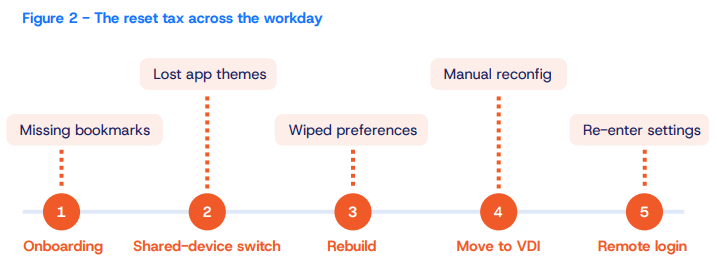
The cost of broken continuity is rarely one big outage. It is a thousand small resets. A user fixes Word. Outlook resets too. The next day, their settings are gone again. Support solved one issue but wiped out preferences somewhere else because too much user state was bundled together. The problem can look small in isolation, but it becomes deeply frustrating when work no longer feels familiar from one session to the next. Broken continuity slows first-day productivity, drives repeat tickets, and teaches users that even a successful IT change may still cost them time. The biggest cost often sits below the surface in hidden time loss, manual triage, reinstall loops, and user downtime. It is not a line item. It is accumulated friction. The pain is not one big event. It is repeated small friction across the user lifecycle.
The Mismatch
Why Legacy Approaches Keep Falling Short
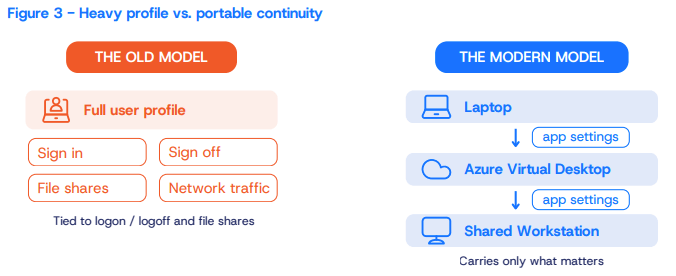
Legacy profile and settings approaches were built for a different era. They assumed longerlived desktops, more stable network boundaries, and a simpler relationship between user, device, and application. That is why so many older methods still move too much data at the wrong time. Instead of carrying forward only what matters, they often sync broad profile data at sign-in and sign-out. Legacy roaming profiles can grow large over time, stay tied to logon and logoff, depend on file shares, and become awkward in cloud-native or Entra ID-joined environments. The old approaches often “take the whole scoop” when only a small subset of settings is actually needed. That makes the experience slower, heavier, and harder to move cleanly across modern work contexts. The bigger issue is fit, not just speed. When settings sync depends on the user signing out, when the payload includes too much, or when the model assumes a traditional file share, continuity breaks down in the places modern organizations care about most: shared devices, frontline work, VDI, cloud-first management, remote workers, and device refresh. The old answer was “roam more.” The better answer is “carry only what matters.”
The Pressure
Why the Problem Gets Worse During Change
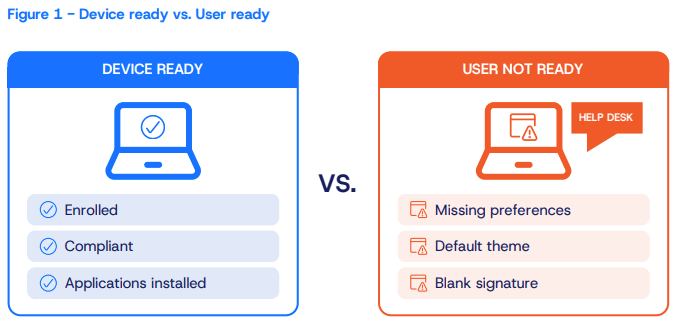
Continuity becomes most visible when organizations change something. That is why this issue feels more urgent now. Teams are managing the Intune transition, Autopilot, device refreshes, hybrid work, nonpersistent VDI, and the move between local and virtual workspaces. In Autopilot, for example, teams often keep provisioning lean just to get devices into users’ hands faster, then finish the rest later. That can be a practical compromise, but it also exposes the real gap: enrollment is not the same as readiness. The device may be technically delivered while the user still lacks the familiar settings and application state that make work feel continuous. Hospitals feel this first on shared devices and stateless VDI. The same problem shows up in banking, call centers, and production floors where people move faster than devices do. This is not a niche annoyance. It is a structural problem in environments where people move more than devices do.
The old model moves too much. A modern model carries only what matters.
The Shift
What Better Looks Like
A better continuity model does not try to move the whole user world every time. It focuses on what the user actually needs to feel ready. That model stays selective. It captures only the settings that matter for each application, restores them at the point of use, and works across local and virtual environments. IT still decides what should roam, what should not, and how narrowly that line gets drawn. The metric has to change too. The question is no longer “Did the profile sync?” or even “Did the install run?” The better question is: Did the user open the application and find the right, usable, governed experience waiting for them? Same user, different device, same result. The Capability
How Application Workspace Helps Close the Gap
User Profile Management lets IT carry forward only the settings that matter for each app. Instead of roaming full profiles, IT captures only what matters for each application and restores it when the application opens. The result is continuity without the weight of moving everything. What matters is the result: a more consistent workspace across shared devices, nonpersistent
VDI, hybrid application delivery, and device changes. This capability is not the first piece of the modern workspace story, but
it is the final piece that makes the rest of the workspace feel complete.
The Plan
What IT Leaders Should Do Next
Three moves turn continuity from a background frustration into a measurable program. ACTION 1
Change the metric
Stop measuring only deployment completion or enrollment success. Add measures that reflect continuity: time to ready after a device change, ticket volume tied to lost settings, and the number of workflows where a user still has to rebuild preferences by hand.
ACTION 2
Find the highest reset tax
It is usually not everywhere at once. It is often concentrated in one onboarding path, one shared-device workflow, one nonpersistent VDI pool, or one frontline role where people move constantly and have little patience for IT friction. That is where the business case becomes visible fastest.
ACTION 3
Start narrow
Begin with one shared-device workflow, one nonpersistent VDI pool, and a small set of high-friction applications, then measure time to ready, reduction in profile data moved, and the drop in “my settings are gone” tickets. This pilot keeps the scope honest and the signal clear.