


This is one of those testing questions that I get asked fairly often:
How can I test to confirm that ConfigMgr is working?
This is a complicated question with a long answer, but the simplest and shortest answer is to test your Management Point (MP). By testing the MP, you can confirm that your site and clients are communicating.
What is a Management Point (MP)?
The MP is used by all clients to send status messages, hardware inventory details, etc. It is also used to receive tasks such as deploying software or software updates. It plays an important role in the health of ConfigMgr. If it’s not working, then nothing will really work.
Testing your MP
The following three commands will help you test your MP health:
- http:///sms_mp/.sms_aut?mplist
- http:///sms_mp/.sms_aut?mpcert
- http:///sms_mp/.sms_aut?MPKEYINFORMATION
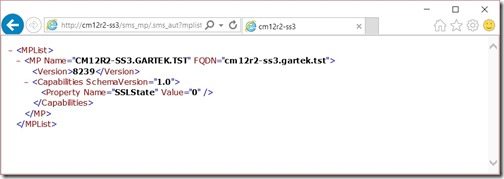
The first one will give you a list of MPs that exist within your environment.
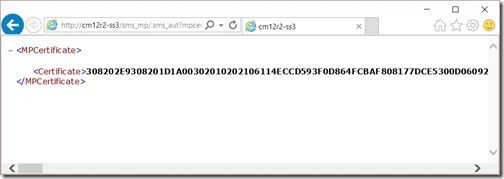
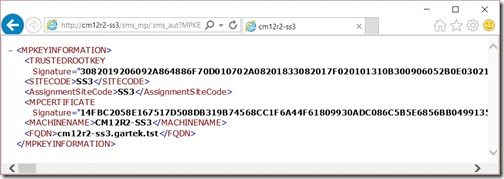
The next two commands will give you certificate/key information for your MP.
This is useful information, but what should you expect to see when you execute this from your PC? Below are examples of what you should expect to see from each command. Remember your results will vary from mine.
http://cm12r2-ss3.gartek.tst/sms_mp/.sms_aut?mplist
http://cm12r2-ss3/sms_mp/.sms_aut?mpcert
http://<ServerName.FQDN>/sms_mp/.sms_aut?MPKEYINFORMATION
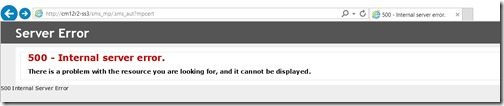
If you get anything that doesn’t look like the above, then you likely have an error, and you will need to review the MP*.log to locate the true errors. Below is a sample error message.
Conclusion: Testing your MP
Employing these three tests will allow you to quickly confirm that your MP is working and that your clients are able to communicate with it. If you have any questions, please feel free to contact me at @GarthMJ.