

ebook


IT Challenges
Environments
Industries
Learn
Engage
Product
Who We Are
Partners
Login
IT Challenges
Environments
Industries
Learn
Engage
Product
Who We Are
Partners
Login
Application Workspace gives IT a single place to deliver, update, and govern applications across Windows, macOS, and virtual desktops. It enhances tools like Intune, Jamf, and Workspace ONE instead of ripping them out.
With Application Workspace, teams:
Employees often have to bounce between multiple portals and one-off links to get the apps they need. It’s confusing, increases help desk tickets, and creates noise for IT.
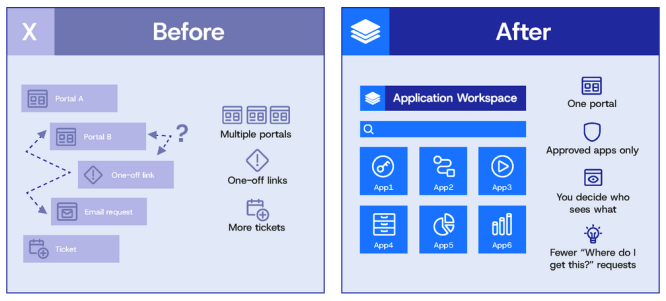
Application Workspace provides a single, intuitive portal for all approved applications across Windows and macOS, with the same experience whether users are on a laptop, Cloud PC, or VDI session. You decide who sees what. They get one place to find their software.
The result: fewer “Where do I get this app?” tickets, higher self-service adoption, and a consistent software experience for every employee.
Rebuilding a device or shipping a new PC often forces users to start from scratch: hunting down apps, recreating preferences, and losing an afternoon (or more) of productivity.
With Application Workspace, you can use context to deliver a baseline during provisioning, then add user-specific apps at first sign-in across macOS, Windows, and virtual desktops. The same user-friendly governance then continues for any optional software and updates.
You get closer to a 30-minute “back to productive” target instead of a half-day (or more) reinstall marathon.
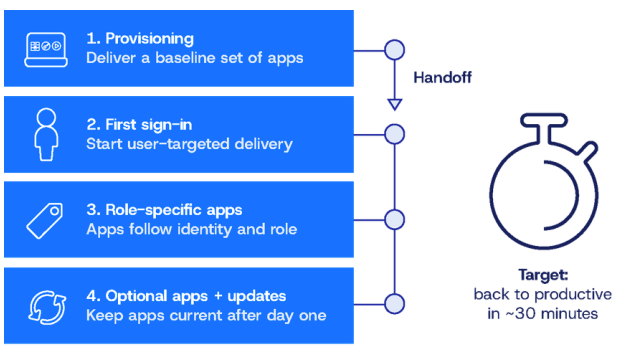
Same approach across Windows, macOS, and virtual desktops
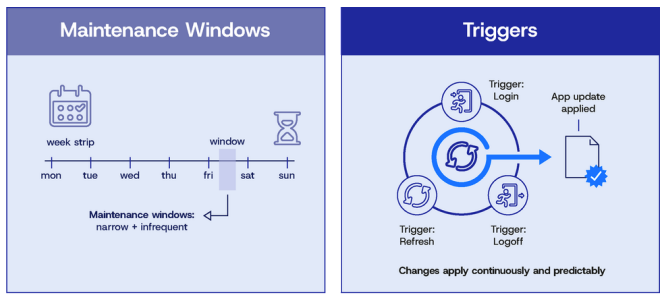
IT teams often juggle software libraries containing hundreds to thousands of applications, multiple OSs, and strict change or maintenance windows. This makes DTAP flows and ring-based rollouts harder to manage, especially when you’re just trying to keep everything organized.
Application Workspace gives you:
You orchestrate complex deployments with less manual sequencing, fewer failed changes, and more predictable rollouts.
Manually updating hundreds or thousands of apps isn’t sustainable. Teams burn valuable cycles repackaging, testing, and chasing down vulnerable or missed software versions.
Application Workspace ships with a curated third-party application catalog and evergreen updates. With Application Workspace, common enterprise apps stay current automatically while carrying your customizations forward across versions—without breaking every time a vendor ships a new build.
You close security gaps faster, reduce patching backlog, and give security teams confidence that third-party software isn’t your weakest link.
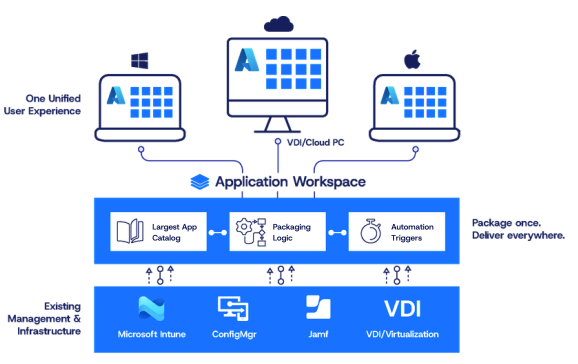
Over time, many organizations bring in separate tools for OS management, self-service portals, packaging, and reporting, including Intune and Jamf. That adds cost and complexity without improving the user experience.
Application Workspace helps you rationalize that stack by centralizing:
You can retire one-off software request portals, packaging utilities, and legacy “shopping” tools while keeping Intune, Jamf, and VDI platforms focused on what they do best: device management and policy.
Leadership wants clear answers: Did the rollout work? Where are we exposed? Are we over-licensed? Native tools often only show basic success/failure states without real context.
Application Workspace gives application-level visibility, including:
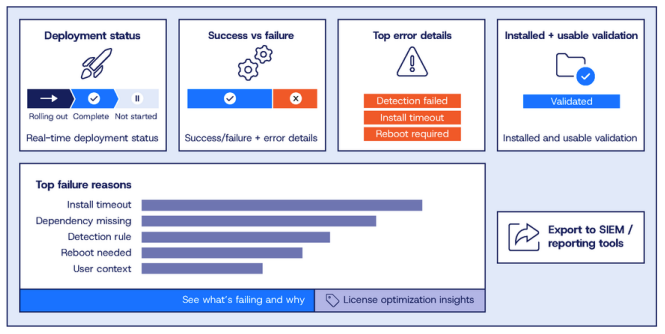
You can export data to your SIEM and reporting tools or use built-in views.
Mergers, acquisitions, and regional business units often leave you with multiple tenants and fragmented environments.
Application Workspace is built to operate across multiple tenants while preserving separation and control. You can:
This turns M&A from “another round of app chaos” into a repeatable playbook.
Modern IT teams are under pressure to:
Application Workspace sits alongside your existing endpoint management tools to elevate application delivery, automation, and user experience. You can make the modern workplace work better, faster, and with far less friction.
Next step: Share this one-pager with stakeholders and compare it against your current app delivery reality. If these pain points look familiar, Application Workspace should be on your short list.