




In most organizations, keeping Windows up to date is already hard enough. Keeping firmware and BIOS up to date is usually much harder.
That is why the Secure Boot certificate expiry in 2026 is worth paying attention to. I do not think this is really a certificate story. I think it is another example of what happens when Windows patching is reasonably mature, but firmware management is still inconsistent. Microsoft’s own guidance points in that direction. It does not just talk about updates. It talks about firmware, staged rollout, and testing by hardware model.
The part that matters for endpoint admins is not only the security angle. It is also the admin overhead this creates when the environment is not already in good shape. If hardware inventory is messy, firmware is updated only occasionally, and model differences are not well understood, this turns into more manual work than most teams want. That is the real reason this topic matters.
What happens if devices miss the update
The basic issue is simple enough. Microsoft’s older Secure Boot certificates begin expiring from June 2026 through October 2026. Devices need the newer 2023 certificates before then.
If they do not get them, the device will usually still boot and keep working, but it can no longer receive future updates to important parts of the boot chain, including newer Secure Boot protections and revocation updates.
That is what makes this more serious than it first sounds. It is not usually an immediate outage. It is a device quietly falling behind in a part of the platform most teams do not monitor very closely.
Why this matters more right now
A lot of teams are already dealing with older hardware and Windows 11 pressure at the same time. Windows 10 support ended on October 14, 2025, and that has forced a lot of organizations to look harder at which devices are still a good fit for Microsoft’s current baseline and which ones are simply still working well enough for users. Secure Boot certificate expiry lands right in the middle of that reality.
Many admins will recognize the pattern. Plenty of organizations have a decent process for monthly Windows updates, but no equally mature process for BIOS and firmware. In some places firmware gets updated during break-fix only. In others it happens during refresh and almost never in between.
That usually stays invisible until something like this shows up. Certificate update eligibility depends on both policy and device firmware, and some devices may need OEM firmware updates before the certificate update can be applied successfully. That makes this a lot more than “just deploy the update and move on.”
Start with inventory, not broad deployment
Because of that, the first step should not be broad deployment. It should be inventory.
Before enabling anything, I would want a clear view of which devices have Secure Boot enabled, what models are in the fleet, and what firmware versions those devices are on. After that, this is one of those cases where model-based targeting makes a lot of sense. If one model family behaves cleanly and another one does not, I want to know that early, and I want the rollout scoped accordingly. Microsoft’s current Intune guidance is clear about staged deployment on hardware that has already been validated.
The other detail that matters is timing. The Secure Boot task runs every 12 hours, and some changes require a restart before the new state is reflected. Assigned does not mean completed and completed does not mean verified.
What you can review in Intune
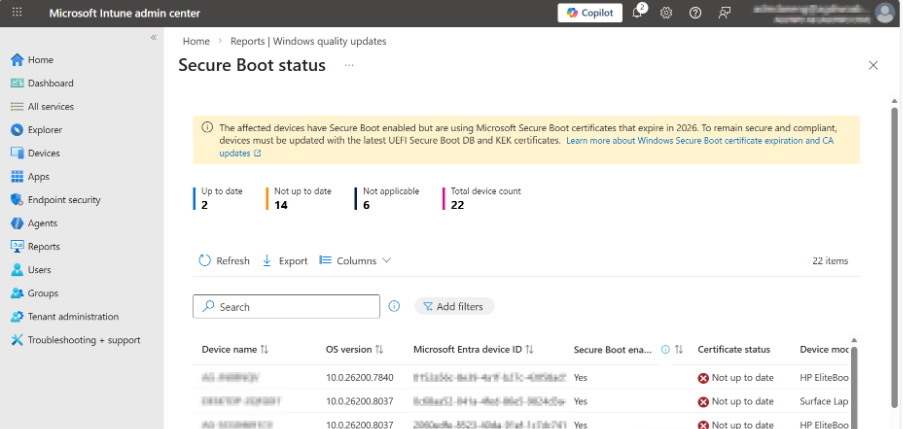
On the Intune side, the reporting story is better than it was a few months ago. If you use Windows Autopatch, there is now a Secure Boot status report that shows which devices have Secure Boot enabled, which are up to date, and which still need certificate updates.
Microsoft also points out an important detail that is easy to miss. Readiness is based on the device’s firmware trust configuration, not just whether a custom script happens to find a certain certificate. There can also be a reporting delay after restart. That is exactly the kind of detail that saves time when people start asking why the script and the portal do not agree yet. For a topic like this, that kind of report matters because it turns a vague rollout into something you can verify.
The screenshot below shows the kind of view that makes this easier to manage in practice. You can quickly see which devices are up to date, which still need updates, and which are not applicable.
If you are not using Windows Autopatch, Microsoft has also published a monitoring-only Intune Remediations package for Secure Boot certificate status. That matters because without some kind of central view this gets expensive quickly. Someone has to figure out which hardware is affected, which models need firmware attention, and which results can be trusted.
I have focused on the Intune side here because that is where the current guidance and reporting options are clearest. In co-managed environments, the same rollout principles still apply. You still need inventory, model-based validation, staged rollout, and a way to verify results. The difference is that some of the reporting and operational work may be more custom depending on how the environment is set up.
The real cost is admin effort
That is also where the real admin impact shows up.
In a clean environment, this is mostly inventory, pilot scope, and reporting. In a messier environment, it becomes model-by-model validation, firmware chasing, and more manual follow-up than most teams want. Someone has to sort out what is actually in scope, who owns OEM escalation, whether the current data is trustworthy, and when a device is safe to move into a broader ring.
That is where this stops being a certificate story and starts becoming an endpoint operations story.
What I would do next
If I owned this in a real environment, I would treat it as a readiness exercise, not a one-off fix.
I would inventory first, validate a small number of representative hardware families next, stage rollout by model, and put reporting in place before going broad. In Intune, that probably means the Windows Autopatch Secure Boot status report. In other environments, I would plan for some custom monitoring work as part of the rollout instead of as an afterthought.
The main point is simple. The Secure Boot certificate expiry matters, but the bigger issue for most teams is not the certificate itself. It is the amount of operational work created when firmware, hardware lifecycle management, and reporting are not already under control.
If the environment is clean, this is mostly a matter of inventory, testing, and staged rollout. If it is not, it turns into more manual work, more exceptions, and more follow-up than it should. That is why this topic matters. It is a security issue, but it is also a very practical reminder that keeping devices current is still part of keeping the environment manageable.
