




Now that we have Active Directory configured in your homelab environment, we are going to configure Accounts, Groups, and GPO’s that are required and useful for your homelab setup.
Container
- System Management: This Container should be created under the System OU or reused if already there. Right click the System Management Container and select Delegate Control. The group ConfigMgr_Servers should have full control of this OU.
AD Accounts – MS Documentation on what accounts are used in ConfigMgr
- CM_Admin: Should be added as Full Administrator in ConfigMgr and Local Admin on the CM server
- CM_DJ: Domain join account for Operating System Deployment (OSD). Follow these instructions for how this account should be configured.
- CM_NA: Network Access Account. Depending on how you want to set up your environment, this account may be unnecessary.
- CM_CP_Workstation and CM_CP_Server: Client push accounts for ConfigMgr. These accounts are used to install ConfigMgr clients on your devices. Note security concerns with using client push accounts.
- CM_SSRS: Reporting Services Role. This will also need to be added to the SQL_Admins group.
- RMSProxy_SRV: Recast Management Server Service Account This account will be for the Recast Proxy and can run actions or read from AD and ConfigMgr.
AD Groups
- ConfigMgr_Servers: This group of computers will contain any ConfigMgr servers you add in your environment. To begin with, this will just include the computer CM. This group is used to target GPO and Security permissions.
- SQL_Admins: This group of users will be used during SQL install to specify Admin rights.
- ConfigMgrAdmins: This group of users will be added to the Local Admins group of all CM servers.
- Workstation_LocalAdmins: This group of users will be added to the Local Admins group on all workstations.
- Server_LocalAdmins: This group of users will be added to the Local Admins group on all servers.
- CM_App_DeployUsers: This group of users will test application deployments to users.
- Web Server Cert Enrollment: This group of computers is allowed to automatically enroll a CA Web Server cert.
- Certificate Admins: This group of users is allowed to enroll CA Web Server certs.
Group Policies
Domain machine policy which will apply to all computers in the domain:
- Enable ICMP (ping) on all computers (How To: Link to Recast Docs)
- Enable WMI (How To: Link to Recast Docs)
- Enable Remote Registry (How To: Link to Recast Docs)
- Enable Remote Desktop and open the Corresponding Firewall Ports
- Add RMSProxy_SRV to Local Admin group
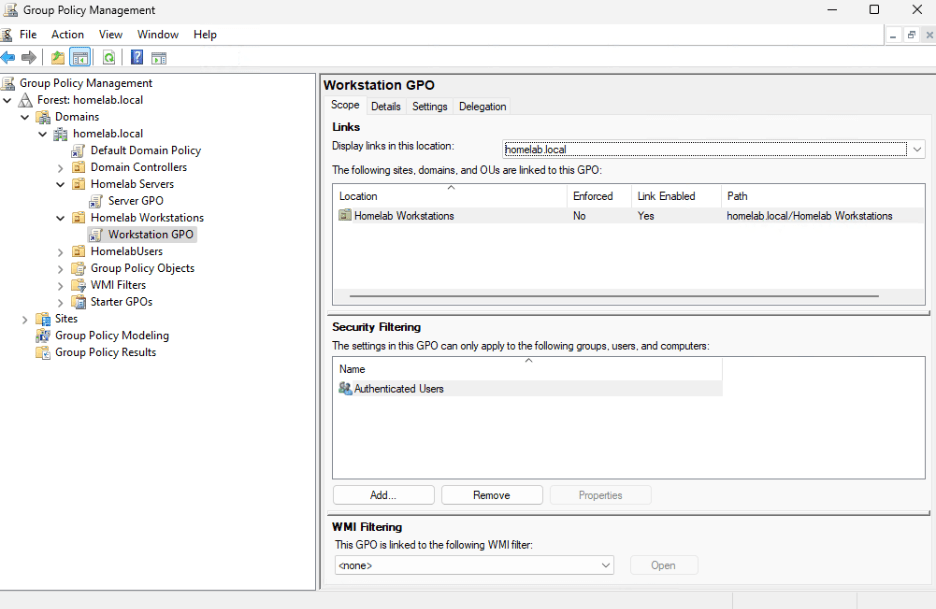
ConfigMgr Servers:
- Add ConfigMgrAdmins to Local Administrator Group.
- Add the file NO_SMS_ON_DRIVE.SMS to C: drives.
All Servers:
- Add Server_LocalAdmins to Local Administrator group.
All Workstations
- Add Workstation_LocalAdmins to Local Administrator group.
That’s it for AD and GPO configuration. Let’s set up the SQL server in the next post.
Next steps
Make your homelab more powerful. Download our free tools to help you automate, troubleshoot, and validate configurations in your test environment.
The Homelab Series
Step 1: Creating a Domain Controller with DNS
Step 2: Adding a Certificate Authority
Step 3: Setting up a Gateway VM to Be Used as a Virtual Router (Optional)
Step 4: Configuration Manager Server Prerequisites
Step 5: Settings for Active Directory and Group Policy
Step 6: Installing SQL For ConfigMgr
Step 8: ConfigMgr Basic Settings
Step 9: Configuration Manager Collections and Application Deployments
Step 10: Installing SQL Server Reporting Services
Step 11: Cloud Management Gateway (CMG) Overview
Step 12: Installing the Recast Management Server and Right Click Tools (Optional Step)
Step 13: Recast Management Server (RMS) Configuration (Optional Step)
Step 13.5: Installing and Using the Right Click Tools Browser Extension
Step 14: Installing Right Click Tools Insights – ConfigMgr Reporting
Step 15: Configuring Right Click Tools Patching
Step 16: Setting up Right Click Tools Privileged Access