




A Cloud Management Gateway (CMG) is a great way to manage ConfigMgr computers when they are not connected to the local network. However, it’s probably a bit beyond what we are trying to accomplish with this build guide. That’s partly because we are designing your test environment to be self-contained, but mostly it’s due to the fact that having a CMG requires a Virtual Machine Scale Set. (Azure services are free only for a 30-day trial.) Here are some documents from Microsoft that describe how a CMG can fit into your production environment.
Communication path for CMG
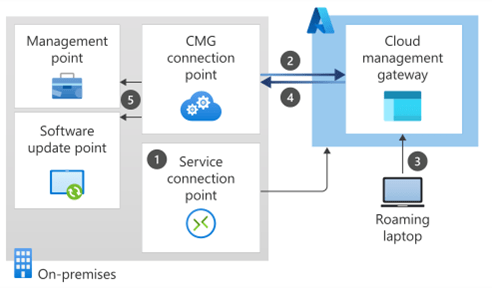
Here’s an official diagram of how communication works for a computer with the ConfigMgr agent installed and connected through a CMG. Notice that the CMG enables “fast channel” communication to the CM servers over the internet. If you’d like a slightly more comprehensive view of how data flows with a CMG in your environment, you can check out the Microsoft page about Data Flow.
What is fast channel?
Fast channel technology was added to ConfigMgr 2012sp1. This is a client notification mechanism that enables ConfigMgr to send messages to clients in an expedited fashion. Here is a Microsoft blog about fast channel that was created when it was introduced in 2012.
Fast Channel isn’t only over CMG
Note that fast channel is active in your ConfigMgr environment even if you don’t have a Cloud Management Gateway installed. The most direct way you’ve probably noticed it is that you see the little green check mark on the computer icon in the ConfigMgr console when ConfigMgr is connected to the client.
Microsoft documentation on planning for a CMG
Here is the official documentation on what you should think about when planning for a CMG to be installed in your environment.
Microsoft documentation on setting up a CMG
Here is the official Microsoft documentation on setting up a CMG in your environment.
Do I need a CMG in my production environment?
If you have internet-only devices that you are managing through ConfigMgr, or if you do not have a local network to connect to your ConfigMgr resources, then yes, you probably need a CMG in your production environment. If you are managing devices that are always on your local network (like the ones in our homelab) you do not.
Can Right Click Tools actions run over CMG?
Yes, Right Click Tools can run actions over the CMG with a Recast Management Server installed and Recast Agents installed on your endpoints. There is a script that will need to be added to your ConfigMgr console. When the script runs, it communicates over the fast channel to the Agent which runs the action and returns results. Communication over CMG is much slower than an externally facing Agent Gateway, but if it’s the only way that you are allowed to communicate with external devices, it is still a viable option.
Next steps
Make your homelab more powerful. Download our free tools to help you automate, troubleshoot, and validate configurations in your test environment.
The Homelab Series
Step 1: Creating a Domain Controller with DNS
Step 2: Adding a Certificate Authority
Step 3: Setting up a Gateway VM to Be Used as a Virtual Router (Optional)
Step 4: Configuration Manager Server Prerequisites
Step 5: Settings for Active Directory and Group Policy
Step 6: Installing SQL For ConfigMgr
Step 8: ConfigMgr Basic Settings
Step 9: Configuration Manager Collections and Application Deployments
Step 10: Installing SQL Server Reporting Services
Step 11: Cloud Management Gateway (CMG) Overview
Step 12: Installing the Recast Management Server and Right Click Tools (Optional Step)
Step 13: Recast Management Server (RMS) Configuration (Optional Step)
Step 13.5: Installing and Using the Right Click Tools Browser Extension
Step 14: Installing Right Click Tools Insights – ConfigMgr Reporting
Step 15: Configuring Right Click Tools Patching
Step 16: Setting up Right Click Tools Privileged Access
Step 17: Updating Recast Products in Your Environment
Step 18: Intune and Your Environment (Optional)